# The Content Calendar That Actually Gets Used: A Creator’s Guide to Consistent Posting
*content calendar template, social media content planner, content planning spreadsheet*
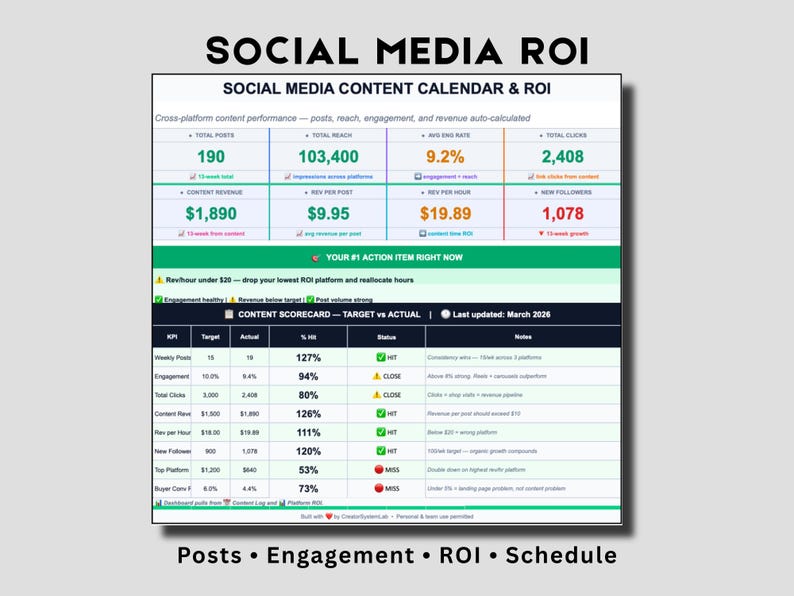
Social Media Content Calendar
Google Sheets content planner with ROI tracking, posting schedule & performance analytics
—
You’ve been here before. You open a shiny new content calendar template—the one with 47 columns and color-coded categories. You fill it out for exactly two weeks. Then life happens. A product launch takes longer than expected. You get inspired to make something completely different. One missed post turns into three, and suddenly your beautiful calendar is gathering digital dust while you’re scrambling to post something, *anything*, at 11 PM on a Wednesday.
The problem isn’t your commitment to consistency. The problem is that most content calendars are designed by people who don’t actually *create* for a living.
Real creators need systems that bend without breaking. We need calendars that feel helpful instead of restrictive. We need tools that actually save us time instead of creating another task on top of an already overwhelming workload.
After working with hundreds of creators, we’ve learned what separates those who maintain consistent posting from those who give up after month one. It’s not motivation. It’s not having more time. It’s having a calendar system that works *with* your creative process, not against it.
Let’s build that system together.
## Why Most Content Calendars Fail (And How Yours Will Be Different)
Before we design the right calendar, let’s acknowledge why the ones you’ve tried before haven’t stuck.
**They’re too complex.** Most templates are built for large marketing teams with dedicated calendar managers. You’re one person (or a very small team) trying to juggle content creation, engagement, customer service, and actual product development. A 50-column spreadsheet doesn’t help—it paralyzes.
**They’re too rigid.** Life doesn’t happen in neat little boxes. Inspiration strikes at 2 AM. A trend suddenly becomes relevant to your niche. A product launch gets pushed back. Real calendars need flexibility built in, not treated as an afterthought.
**They’re disconnected from your actual goals.** Many templates ask you to plan content without ever asking: “What are we actually trying to accomplish?” Are you building an audience? Driving sales to your Etsy shop? Establishing authority? Growing email subscribers? Your calendar should reflect *your* specific goals, not generic “post consistently” advice.
**They don’t track what actually works.** You fill out the calendar, you post, then what? Without a way to measure what’s landing with your audience, you’re just guessing. Next month, you plan the exact same content hoping for different results.
The calendar that actually gets used does the opposite on all counts. It’s minimal. It’s flexible. It’s goal-focused. And it connects to your metrics.
## The Minimum Viable Content Calendar: What Fields Actually Matter
Let’s start with ruthless prioritization. You need *five* core fields in your content calendar. Five. Not fifteen, not thirty. Five.
**1. Date/Platform** — When and where this content lives. “March 28 - Instagram Reel” or “April 2 - Pinterest Pin (evergreen board).”
**2. Content Type** — What format is this? Video? Carousel? Quote graphic? Blog post? This matters because different formats have different prep and posting time requirements.
**3. Core Message/Hook** — The one sentence that captures what this piece is about and why someone should engage. Not the full caption, just the core message. “Showing 5 templates that saved us 10 hours/week” or “Sharing the #1 mistake in content planning.”
**4. Status** — Is this ideated, written, scheduled, posted, flop, or winner? Knowing where something sits in your workflow prevents panic at 10 AM when you realize nothing’s scheduled.
**5. Engagement/Notes** — A single cell where you jot down either how this piece performed (likes, saves, clicks) or any notes about execution. “200 saves, 3 DMs asking about ROI tracker” or “Technical hiccup with video length.”
That’s it. That’s your foundation.
If you want to get slightly more sophisticated, add one optional field: **Content Pillar**. We’ll talk about what that means in a minute. It’s worth tracking because it prevents you from posting the same ideas repeatedly.
Everything else—hashtags, link details, alt text—goes in a separate reference document or in your design/writing app. Your calendar is for *planning* and *tracking*, not for storing every micro-detail. That’s what makes it actually usable.
## Building a Calendar That Sticks: Start Simple, Then Iterate
Here’s the biggest mistake creators make with their systems: they try to build a perfect calendar on day one.
Instead, build a *good enough* calendar on day one. Then improve it based on what you learn.
**Week 1:** Grab a template. Fill out the next two weeks of content using your five core fields. Don’t overthink it. You’re not trying to be perfect here; you’re trying to establish the habit of planning.
**Week 2:** Post according to your plan. Notice what feels off. Did you plan for too many videos when you only have time for three? Did you schedule posts during times your audience isn’t active? Jot these observations down—don’t fix them yet.
**Week 3:** Review what worked (and what didn’t). Update your next two weeks based on those insights. Add a new field if it would genuinely save you time. Remove a field if you’re not using it.
**Month 2+:** Keep iterating. Your calendar in month three will look different from month one, and that’s healthy. You’re building a system that fits your actual workflow, not forcing yourself into someone else’s framework.
The creators we see stick with their calendars are the ones who treat the calendar as a living document, not a finished product.
## Content Batching: How to Create More in Less Time
Here’s a secret that changes everything: you don’t need to create content daily. You need to *post* consistently. Those are wildly different things.
Enter batching.
Content batching means dedicating specific time blocks to create multiple pieces of the same type at once. Instead of filming one TikTok on Monday, one Wednesday, and one Friday (a fragmented approach), you film eight TikToks in one Saturday session, then schedule them throughout the month.
**How to batch by format:**
- **Reels/TikToks:** One filming session = 6-10 videos. Dedicate 2-3 hours, film them all back-to-back, and schedule them over 2-4 weeks.
- - **Pinterest pins:** One design session = 10-15 pins. Batch these by topic or month, then schedule them across your calendar.
- - **Written content:** Pick one day for ideation and outlining, another for writing, another for scheduling. Don’t try to do all three for each piece separately.
- - **Carousel posts:** Batch by theme. One session creates 3-5 thematic carousels for the month.
Batching cuts your content creation time roughly in half because you’re not context-switching. Your brain isn’t toggling between “filmmaker mode” and “writer mode” ten times a week. You’re in one mode for a dedicated block, then you’re done.
The magic? When you batch, you also increase quality. You’re not scrambling to create content on the day you’re supposed to post it. You’ve got breathing room. You can film, review, refilm if needed, *then* schedule.
## Platform-Specific Posting Schedules: Where to Post and When
Different platforms have different audiences and different behaviors. Your posting schedule should reflect that.
**Instagram (feed + Reels):** Feed posts 3-4x per week (Tuesday-Thursday, 9-11 AM your timezone). Reels 2-3x per week, can go later in the day (6-9 PM). Consistency matters more than frequency here.
**TikTok:** 4-7 videos per week, and timing matters less. TikTok’s algorithm is less time-dependent than Instagram. If you’re batching, post older content throughout the week to maintain consistency.
**YouTube Shorts:** 3-5 per week, posted on your main channel. If you’re also doing longer YouTube videos, space them out—weekly or bi-weekly depending on your capacity.
**Pinterest:** This is where volume works. 5-15 pins per week, spread across evergreen and trending boards. Timing matters less because Pinterest functions as a search engine. The pins live for months, not hours.
**LinkedIn:** 2-3 times per week for best reach. Professional audience, mid-morning posting tends to perform well. Monday, Wednesday, Friday is a solid schedule.
**Email/Blog:** 1-2 times per week. This is your *owned* platform—the one that doesn’t depend on algorithms. Consistency is critical here.
The key insight? You’re not posting the *same* content to every platform at the same frequency. You’re meeting each platform where it lives. A TikTok twice weekly at 6 PM on Instagram might be an Instagram Reel three times per week. A long-form blog post becomes a carousel, a TikTok series, and three LinkedIn posts.
This is where your calendar’s “Platform” field becomes crucial. It forces you to think about where each piece of content actually belongs.
## The Content Pillar Framework: Never Running Out of Ideas
One of the biggest reasons creators abandon their calendars? They run out of ideas by week three.
The solution is the content pillar framework. Instead of brainstorming random content, you organize all your content around 3-5 core pillars. These are the themes that define your brand and expertise.
For a creator tools shop, those pillars might be:
- **Productivity & Time Management** — Templates, batching strategies, workflow optimization
- 2. **Systems & Organization** — Business dashboards, SOPs, delegation frameworks
- 3. **Data-Driven Decisions** — Analytics, tracking ROI, measuring what works
- 4. **Creator Mindset & Community** — Overcoming imposter syndrome, celebrating wins, peer wisdom
- 5. **Platform Mastery** — Pinterest strategies, TikTok trends, email growth
Now here’s the magic: once you have these five pillars, you never run out of content ideas. You simply rotate through them.
One week of your calendar might look like:
- Monday: Productivity pillar (batch your content while working)
- - Wednesday: Systems pillar (your Etsy shop’s dashboard systems)
- - Friday: Data pillar (ROI tracking for creators)
- - Sunday: Creator mindset (community building)
The next week, same structure, different angle. You’re always exploring the same core themes, but from different angles. This makes your brand coherent (people know what to expect from you), and it makes planning mechanical (not creative, which is less draining).
Add your content pillars to your calendar as a tracking field. Then, when you sit down to plan, you’re not staring at a blank page. You’re asking: “Which pillar needs attention this week? What angle haven’t I covered?” This changes planning from “What should I post?” to “What’s next in this pillar?”
## How to Track What’s Actually Working
Here’s where most creators drop the ball. They post consistently, but they don’t measure consistently. Without measurement, you can’t improve.
Your content calendar needs to connect to a simple tracking system. This doesn’t need to be complicated—just honest.
**Immediately after posting, log:**
- Platform + post date
- - Content type and pillar
- - Basic engagement (likes, comments, shares, or saves—whatever matters for that platform)
**Weekly, review:**
- Which content pillars are getting the best engagement?
- - Which content types are you naturally gravitating toward (and are they getting results)?
- - What’s the ratio of posts that underperform vs. winners?
**Monthly, ask:**
- Are the posts driving measurable results toward your actual goal? (Sales? Email signups? Audience growth?)
- - What’s one pattern you’re noticing about what works?
- - What pillar or content type needs more attention?
Most creators skip this because they think they need advanced analytics. You don’t. You need a simple Google Sheet with platform, date, pillar, engagement numbers, and a notes column for what you learned. That’s enough to dramatically improve your content over three months.
The creators who see the biggest improvements treat their content calendar as a testing ground. They’re not just posting; they’re experimenting with small bets and tracking what wins. Then they double down on what works.
## Repurposing Strategy: One Piece of Content, Multiple Platforms
Here’s where your content calendar becomes a lever for exponential reach: repurposing.
One well-researched, well-executed idea can become:
- A long-form blog post (1500+ words)
- - A 3-5 image carousel post (Instagram/LinkedIn)
- - 4-6 TikTok/Reel videos (each focusing on one piece of the main idea)
- - 8-10 Pinterest pins (different designs, each pin optimized for different keywords)
- - A 1-minute YouTube Short
- - 2-3 LinkedIn posts (different angles)
- - A 5-part email series for your subscribers
- - One podcast episode or video essay (if that’s your format)
This isn’t cheating or being lazy. This is smart leverage.
When you sit down to create, you’re not creating for one platform. You’re creating a “content asset” that lives everywhere. Your calendar should reflect this—show which assets are born from the same core idea.
Example: “How to Batch Content for Consistency”
- Blog post (evergreen, heavily SEO-optimized)
- - Carousel: “5 Batching Strategies” (Instagram/LinkedIn)
- - TikTok series: “Day in my life batching content” (4-part series)
- - Pinterest pins: “Batch your TikToks in 3 hours,” “Content batching saves time,” etc. (8 pins)
- - Email series: “5-Day Batching Bootcamp” (5 emails)
You created once. You planned once. The reach is 10x because you’re thinking about distribution from the start.
When you update your calendar, add a “Content Asset” field that connects related posts across platforms. Then, when you’re tracking what worked, you see the full picture. That blog post got 200 visits. Those Pinterest pins accumulated 5,000 impressions. That TikTok series got 50,000 views. That’s the actual reach of your single day of creation.
## Building Your First Month: The Practical Steps
Let’s make this concrete. Here’s how to build your first month of content:
**Step 1:** Choose your 3-5 content pillars. Write them down. Don’t overthink this—what are you actually good at and obsessed with?
**Step 2:** Grab a simple content calendar template. You can use our Content Calendar Template specifically designed for creators—it has exactly the fields that work and nothing else (https://www.etsy.com/listing/4472905315/content-calendar-google-sheets-template). Or build your own Google Sheet with your five core fields.
**Step 3:** Fill in your next 30 days with one post per day minimum, distributed across your platforms based on the schedules we discussed. Don’t write full captions—just the core message/hook for each post. This takes about 2 hours for the whole month.
**Step 4:** Batch create for your first week. Use this template: spend 3 hours Friday creating all your week’s content. Schedule it all. Breathe.
**Step 5:** Post according to plan. Track engagement in a simple sheet or notes.
**Step 6:** At the end of week 2, review what worked. Adjust your next two weeks based on that.
That’s it. You’re not trying to be perfect. You’re building a system that fits your actual life.
## The Calendar That Actually Grows Your Business
Here’s what separates a content calendar that feels helpful from one that feels like busywork: connection to your business goals.
Your calendar isn’t just about posting consistently (though consistency matters). It’s about posting the *right* content that moves your business forward.
If your goal is growing email subscribers, your calendar should show which posts include email signup CTAs and which don’t. If your goal is selling your Etsy products, your calendar should connect to which content brings traffic to your shop. If your goal is establishing authority, your calendar should track which posts get shared and commented on.
This is where tools like our Creator Goal Scorecard (https://www.etsy.com/listing/4472919488/creator-goal-scorecard-business-progress) bridge the gap between your calendar and your actual outcomes. It connects your monthly content output to your business metrics so you can see what’s actually working.
The magic happens when you stop viewing your content calendar as “what you post” and start viewing it as “how you build your business.” Every post is a small experiment. Every month, you learn what works. Every three months, you’re noticeably ahead of where you started.
## Your Closing Thought: Consistency Beats Perfection
The content calendar that actually gets used isn’t the prettiest one. It’s not the most detailed. It’s the one you’ll actually open, update, and reference three months from now.
Start simple. Start with batching one format. Start with tracking one metric. Build from there. Your system will evolve as you do, and that’s healthy.
The creators who see real growth aren’t the ones posting every three hours with AI-generated content. They’re the ones showing up consistently with real, helpful content that comes from their actual experience. A calendar helps you do that without burning out.
You’ve got this.
—
Grab the Free 30-Day Content Calendar Starter (#signup) — No spam, just the starter template delivered straight to your inbox.