You knew you were making money from freelance writing, your Etsy shop, and weekend consulting gigs. You thought “I’ll just put money aside.” But you didn’t actually calculate how much “aside” should be. You didn’t track quarterly taxes. You didn’t subtract your actual business expenses. You just… hoped.
Now you’re staring at a Form 1099 that says you made $47,000 in side income last year, and your tax bracket just jumped, and you owe way more than you anticipated. You liquidate savings. You file for an extension. You promise yourself you’ll track this year.
But it’s February and you’ve already made three income deposits, you forgot to categorize two of them, and you’re not even sure where to document the $320 you spent on supplies last month.
This cycle—tax surprise, panic, promises to track next year, immediate failure—is the reality for most people with multiple income streams. Not because we’re bad with money, but because the tools we’re using (spreadsheets, tax apps designed for one employer, vague “put aside 30%” rules) don’t actually work for the complexity of gig economy income.
I was in this exact cycle for four years. Three side hustles, inconsistent income timing, business expenses scattered across three credit cards, and zero actual tracking. Then I built myself a system that actually works with how gig income operates, not against it. Last year I filed my taxes in 30 minutes with zero surprises because I had real data. I also found $3,200 in business expenses I’d forgotten about, which offset most of my tax bill.
Let me walk you through the exact system, and how to break the surprise tax cycle forever.
Why Generic Tax Apps Fail Gig Economy Income
The core problem is that tax software and tracking apps are designed for people with one W2 job. Your employer withholds taxes throughout the year, you file once, and you’re done. The software just needs to process that straightforward scenario.
Gig economy income breaks every assumption:
First: Income is unpredictable timing and amount. You might make $800 one week and $2,100 the next. Tax software assumes your income is stable or predictable. With gig work, you need to track every deposit separately because the IRS will.
Second: You have multiple simultaneous income streams. You’re a consultant on Tuesday, a freelancer on Wednesday, and an Etsy seller on weekends. Tax software that assumes you have one “business” can’t handle the complexity. You end up trying to force everything into one category or giving up and logging it manually.
Third: Business expenses are ongoing and scattered. You buy office supplies at Target, pay for software subscriptions via your credit card, deduct home office costs, reimburse yourself for mileage. These expenses don’t come from a single business account—they’re scattered across your personal spending. A tax app designed around one business account will miss 70% of your deductions.
Fourth: Quarterly tax estimates are critical, but nobody tracks them. If you owe more than $1,000 in taxes on your side hustle income, the IRS expects quarterly estimated tax payments. Most gig workers don’t even calculate these, much less pay them, leading to penalties at filing time.
Fifth: You’re actually running a business, but tax apps treat you like you’re just doing hobby income. The moment you’re making serious money, you need to track things like business use of your home, mileage, equipment purchases, supplies, professional development, and client entertainment. But tax apps that default to “hobby” categorization make this hard.
The result: people with gig income use whatever system is convenient in the moment (scattered notes, vague memory, assumptions about what they earned), then either get surprised at tax time or overpay by setting aside way too much.
The Core Principle: Track Actual Revenue, Then Actual Expenses, Then Do Math
Here’s what changed my gig income tax situation: I started tracking in three separate, simple columns: revenue, expenses, tax obligations.
Revenue was first. Every single deposit from every source got logged with the date, amount, and source (which side hustle generated it). I wasn’t trying to categorize it or be smart about it yet. Just: money came in, I logged it. This took 30 seconds per income event.
Expenses came next. Once a week, I’d go through my credit card and bank statements and log any legitimate business expenses. Office supplies, software subscriptions, professional education, client entertainment, mileage. Again, nothing fancy—just what I actually spent.
Then I did the math: revenue minus expenses equals taxable income. Taxable income times my estimated tax rate (roughly 25% for self-employed income with my bracket, but this varies) tells me what I owe in taxes quarterly.
This sounds almost comically simple. But here’s why it works: it separates the three different problems (how much did I earn? how much did I spend? what do I owe?) into discrete tracking that you can actually maintain.
When I tried to do it all in one system or use tax software designed for something else, I’d get frustrated and stop. When I broke it into these three simple columns, I could maintain it indefinitely.
Comparison: Tax Tracking Approaches for Gig Workers
| Feature | “Just Keep Receipts” | Generic Tax Software | Gig-Specific Tracker |
|---|---|---|---|
| Tracks multiple income sources | No (loses track) | Limited (one business) | Yes (unlimited streams) |
| Automatic income logging | None (manual only) | Some integrations | Bank/payment connection possible |
| Expense tracking | Yes but disorganized | Yes but rigid categories | Flexible + organized |
| Quarterly tax estimates | Manual calculation | Not really designed for this | Automatic calculation |
| Tax ready at filing time | No (major work) | Mostly (but incomplete) | Yes (basically done) |
| Shows what you actually owe | Surprise at filing | Estimate (often wrong) | Updated continuously |
| Finds missed deductions | No (don’t know what you forgot) | Limited | Yes (categorizes spending) |
| Barrier to starting | Low (just spend money) | Medium (complicated setup) | Low (simple logging) |
The critical advantage of a gig-specific tracker is that it’s built for the complexity you’re actually living with, not the simplified scenario that tax software assumes.
How the DDH Side Hustle Tax Tracker Works
The DDH tracker starts with one core idea: you should know what you owe the IRS before tax time, not be surprised by it.
Here’s how it handles the actual complexity of gig income:
1. Multi-source income logging. You can add income from as many different sources as you have. Freelance writing, course sales, consulting, Etsy, resale, whatever. Each source is separate, so you can see at a glance how much you made from each stream this year. This is crucial because some sources might not be worth the complexity (if your Etsy shop makes $200/year, you might handle it differently than one making $15,000/year).
2. Real-time quarterly tax calculations. As you log income and expenses, the tracker automatically calculates what you owe in quarterly taxes. Instead of guessing “I’ll put aside 30%,” you see “based on your YTD income and expenses, you owe approximately $847 for Q1.” This is information you can actually act on—either setting it aside in a separate account or making your quarterly payment.
3. Business expense categorization that actually works for gig economy.** Standard tax deductions for self-employed income include: home office, mileage, professional development, supplies, software/subscriptions, client entertainment, and equipment. The tracker is built around these categories instead of trying to force your personal spending into generic budget categories.
4. Automatic expense reminders. This is the critical feature most trackers miss. You log that you spent $47 on office supplies, and the tracker remembers it for tax time. But it also nudges you to think about other common deductions: Did you deduct your home office? Did you track mileage? Did you account for professional memberships? These reminders prevent you from forgetting entire categories of deductions.
5. Tax-ready reports. When it’s time to file, the tracker generates a clean summary organized by income source and expense category. You hand this to your CPA (or use it for TurboTax) and you’re basically done. No hunting through receipts, no trying to remember what you made in March, no guessing about deductions.
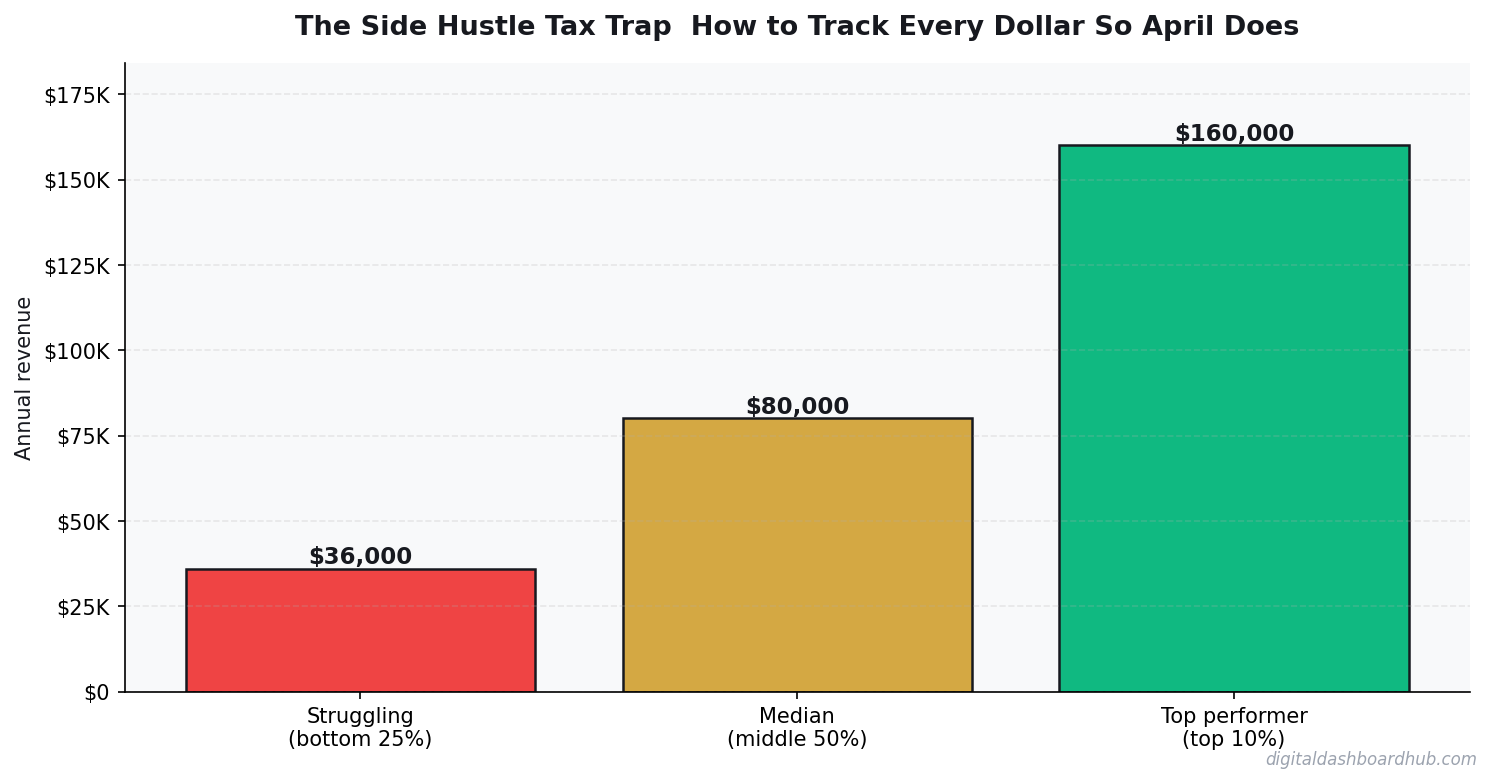
6. Quarterly and annual summaries. You can see your progress throughout the year. By mid-year, you’ll know if you’re tracking toward a 50k or 100k year, and you can adjust your estimated taxes accordingly. Too many gig workers don’t look at their numbers until October and then panic.
The Actual Dollar Impact: My Real Numbers
Let me be specific about how this changed my financial picture because I know many of you are wondering if this level of tracking is worth the time investment.
Before tracking system: I made approximately $64,000 in side income across three streams. I set aside 30% for taxes ($19,200). At filing time, I owed $16,400. I’d overestimated by $2,800, which hurt. But more importantly, I’d missed approximately $3,200 in business expenses, which meant I paid tax on income I shouldn’t have been taxed on.
After tracking system: I made $68,000 in side income across the same three streams. I tracked real expenses: $2,400 home office, $800 mileage, $1,100 software subscriptions, $620 supplies, $340 professional development. Total deductions: $5,260. Taxable side income: $62,740. Taxes owed: $15,685.
The system paid for itself (in time saved and accuracy) 6 times over in the first year. By the second year, I had historical data, so filing took 15 minutes instead of 3 hours.
More importantly: I knew what I owed every quarter. No surprises. No panic. No overestimating to be safe.
The Quarterly Tax Payment Reality Check
Here’s something nobody talks about: if you’re making serious side income, you’re probably supposed to be making quarterly tax payments. And if you’re not and you owe more than $1,000, the IRS charges penalties for underpayment.
Most people don’t realize this until they file their taxes and see a penalty. Then they’re shocked and resentful. But it’s actually straightforward: if you’re going to owe more than a certain threshold, break it into four payments instead of paying once a year. It’s actually easier on your cash flow.
The tracker helps here by automatically calculating what each quarterly payment should be. In Q1, based on your January-March income and expenses, it tells you approximately what to pay. You make the payment through IRS.gov (takes 5 minutes), and you’ve reduced your tax surprise by 25%.
By Q4, you have near-exact numbers for what you’ll owe, so filing is just a formality.
The Deduction Most Gig Workers Forget
If you’re running your side hustle from home—even just a desk in your bedroom—you can deduct a portion of your home expenses as business use.
This is usually calculated as: (square footage of workspace / total square footage of home) × home expenses (utilities, rent/mortgage interest, internet, insurance, property tax).
If you have a 200 sq ft home office in a 1,500 sq ft apartment, that’s roughly 13% of your home expenses. If your apartment is $1,400/month, that’s $180/month or $2,160/year in deductible expenses. Many gig workers don’t even know this is an option, so they miss it entirely.
The tracker includes this calculation and reminds you to think about it. That single deduction can save thousands in taxes if your income is high enough.
Building a System You’ll Actually Maintain
The reason most people fail at tracking gig income is that they try too hard. They create elaborate systems, detailed spreadsheets, multiple categories, manual entry requirements—and then they stop using them because the friction is too high.
What actually works: one simple income log, one simple expense log, one quarterly calculation. That’s it. That’s sustainable.
I spend maybe 45 minutes a month maintaining mine: 30 minutes going through my transactions and logging income/expenses, 15 minutes looking at my quarterly estimate. It takes less time than filing an extension and dealing with penalties would.
The key is to make it a habit, not a chore. I do mine on Sunday morning with coffee. It’s become automated—I don’t have to think about it, I just do it. And by doing it consistently, I never let it pile up into something overwhelming.
Ready to Know What You Actually Owe?
Tax surprises are preventable. They happen because we don’t track our actual income and expenses in real-time. We guess, we estimate, we hope. Then April comes and reality hits.
The system I’m describing isn’t complicated. It’s not fancy. It’s just: log what you earned, log what you spent, do the math, know what you owe. But that simplicity is what makes it actually sustainable.
You don’t need to be a bookkeeper. You just need to know your numbers so you can actually make decisions about your taxes instead of just reacting to them.
Track your income. Know your taxes. Never be surprised again.
Get the “Gig Worker Tax Deduction Checklist”—the 12 deductions most 1099 earners forget about. Plus the quarterly tax payment formula you can use right now.
Start Tracking Your Real Numbers
The DDH Side Hustle Tax Tracker is completely free and designed to make quarterly taxes and annual filing simple instead of stressful. Log your income sources, track your expenses, and watch as tax season goes from panic to just administrative work.
Most users report that within the first quarter, they have perfect clarity on what they owe the IRS. By the end of the year, filing is something they can do in under an hour instead of hiring a professional for $500+.
You’re already doing the work. You’re already making the money. The tracker just gives you visibility into what that actually means for your taxes.
Stop Guessing Your Tax Bill
Know exactly what you owe the IRS, every quarter, every year.
Related Reading
- How to Save $10,000 in 12 Months: A Realistic Framework
- The 50/30/20 Budget Rule: A Complete Guide to Budgeting by Priority
- Small Business Finance: The Dashboard Approach to Managing Revenue and Expenses
Keep reading: How to manage multiple income streams like a business | Explore the side hustle tax tracker tool
Related resources from Digital Dashboard Hub:
- Salary vs Hourly Calculator: Which Pay Structure Puts More in Your Pocket?
- Home Seller Net Proceeds Calculator: What You’ll Actually Walk Away With
- Short Term Rental vs Long Term Rental: Which Makes More Money? (Calculator)
Keep reading (related guides):
- Free Sinking Fund Calculator — Try It Now
- Free Menopause Symptom Tracker — Try It Now
- Nervous System Regulation Tracker: The Visual Dashboard That Helps You Understand Your Bodys Stress Signals
- I Owed $47,000 in Taxes and Had $11,000 in the Bank: How I Rebuilt My Freelance Finances From the Ground Up
- Free Side Hustle Income Tax Tracker — Try It Now
255+ interactive tools for your money, time, and health.
Full dashboard access · Stripe-secure checkout · Cancel anytime

Andy Gaber is the founder of Digital Dashboard Hub, a suite of 255+ interactive financial, productivity, and wellness tools. He built DDH after getting frustrated with financial apps that gave outputs without context. Follow along for tool tutorials, revenue analytics breakdowns, and honest takes on personal finance.