When you hit publish on your first YouTube video, you’re probably thinking about views and subscribers. But once those numbers start climbing, a new question emerges: How much money am I actually making?
The truth is, YouTube revenue isn’t as straightforward as it appears. It’s not just about AdSense payments—and the income potential varies wildly depending on your niche, audience location, and how diversified your revenue streams are. This guide breaks down exactly how YouTube creators earn money, demystifies the metrics that matter, and shows you how to forecast and track your own income with precision.
Understanding CPM: The Foundation of YouTube Revenue
Enter your own numbers in the interactive tool below and get a real-time read. The dashboard version adds saved scenarios, history, and full feature access.
If you’re new to creator economics, CPM (Cost Per Mille) is the metric you need to understand first. It’s the amount advertisers pay for every 1,000 ad impressions on your video.
Here’s how it works: When a viewer watches your video with ads enabled, YouTube places ads in front of (or during) that content. The advertiser pays YouTube, which then shares a portion with you. That payment per 1,000 impressions is your CPM.
Example: If your video gets 100,000 views with a $5 CPM, you’d earn approximately $500 from AdSense (though YouTube takes a 45% cut, so you’d actually receive around $275).
Typical CPM Ranges by Niche
CPM varies dramatically based on your audience and content type. Here’s what creators typically see:
- Finance & Investment Content: $15-$50 CPM (highest-paying niche because advertisers spend more)
- Technology & Software: $8-$25 CPM
- Business & Entrepreneurship: $10-$30 CPM
- Health & Fitness: $5-$15 CPM
- Gaming & Entertainment: $2-$8 CPM
- General Lifestyle/Vlogging: $1-$5 CPM
- Kids Content: $0.50-$2 CPM (lowest due to limited advertiser options)
Location matters too. Viewers from the United States, United Kingdom, Canada, and Australia typically generate higher CPMs because advertisers pay more to reach these audiences. Viewers from developing nations usually result in lower CPMs, even for identical content.
What Influences Your CPM?
Several factors affect whether your CPM lands on the lower or higher end of these ranges:
- Audience demographics: Wealthier, English-speaking audiences = higher CPMs
- Content type: Educational and finance content commands premium rates
- Seasonality: CPMs spike during Q4 (October-December) when advertisers increase spending
- Video length: Longer videos (10+ minutes) allow more ad placements and higher overall revenue
- Viewer engagement: Higher watch time and lower bounce rates signal quality to advertisers
Beyond AdSense: Your Real YouTube Revenue Streams
Here’s a critical insight most beginner YouTubers miss: AdSense is rarely your biggest income source once you scale.
A creator with 500K subscribers might make $2,000-$5,000 monthly from ads, but significantly more from alternative revenue streams. Let’s break down each:
1. Sponsorships & Brand Deals
This is where serious income happens. Sponsors pay you to promote their products or services within your videos. Rates depend on subscriber count and engagement:
- 10K-50K subscribers: $100-$500 per sponsorship
- 50K-500K subscribers: $500-$5,000 per sponsorship
- 500K+ subscribers: $5,000-$50,000+ per sponsorship
Sponsorship income often dwarfs AdSense—a creator might make $3,000 from ads in a month but $10,000 from two sponsorship deals.
2. Channel Memberships
YouTube’s built-in membership system lets viewers pay you directly for exclusive perks. You keep 70% of membership revenue.
A channel with strong community engagement might generate $500-$3,000 monthly from memberships at 50K+ subscribers. The key is making memberships feel valuable—exclusive videos, Discord access, early uploads, etc.
3. Super Chat & Super Likes
During live streams and Premieres, viewers can send you paid chat messages. YouTube takes 30%, you keep 70%.
This isn’t huge income for most creators, but gaming and entertainment channels that do regular live streams can see $100-$1,000+ monthly from this feature.
4. Affiliate Marketing
Promote products or services and earn a commission when viewers purchase through your unique links. This is incredibly flexible:
- Software tools & SaaS: 20-30% commission
- E-commerce products: 3-10% commission
- Digital products: 20-50% commission
A finance creator with 100K subscribers recommending a $99/year budgeting tool at 20% commission could make $5,000-$15,000 monthly if they promote strategically.
5. Digital Products & Merch
Many creators sell their own products:
- Digital downloads: Spreadsheets, templates, guides (high margin, passive income)
- Courses: $49-$299+ (requires significant time investment)
- Merchandise: T-shirts, hoodies, etc. (typically 10-30% margin after production)
- Coaching/Services: $50-$500+ per hour (one-on-one work)
A successful digital product launch can generate $1,000-$20,000+ depending on your audience size and product-market fit.
Real Income Expectations at Different Subscriber Levels
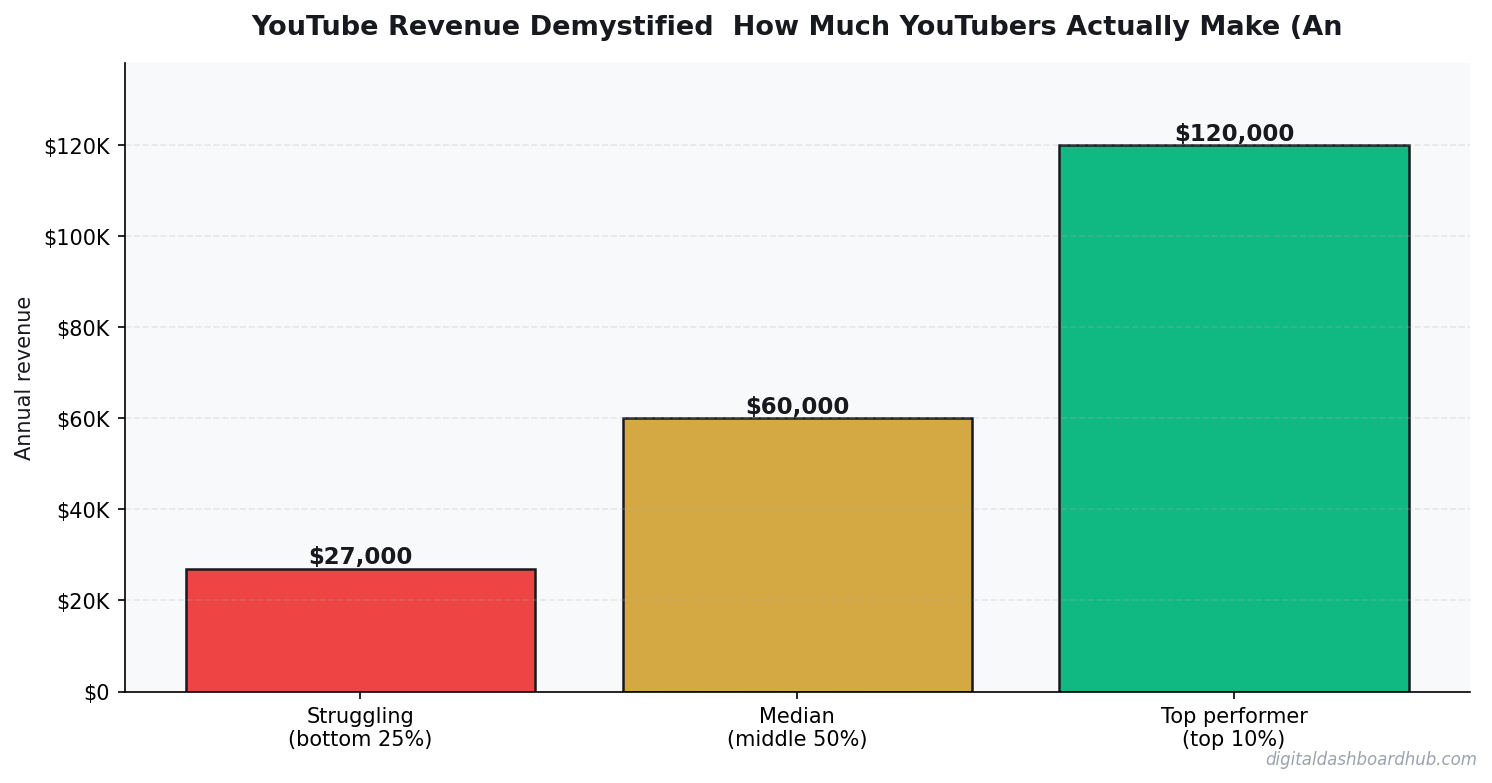
Let’s get specific with realistic numbers. These are monthly averages accounting for AdSense, sponsorships, and diversified income:
| Subscriber Count | Monthly YouTube Income | Income Range |
|---|---|---|
| 1K – 10K | $50-$300 | Mostly AdSense; sponsorships rare |
| 10K – 50K | $300-$2,000 | AdSense + occasional sponsors |
| 50K – 100K | $1,500-$5,000 | Multiple revenue streams begin scaling |
| 100K – 500K | $5,000-$20,000 | Strong sponsor deals + diversified income |
| 500K+ | $20,000-$100,000+ | Sponsorships dominant; high affiliate potential |
Critical caveat: These numbers assume consistent upload schedules, decent engagement rates, and audience optimization. A creator with 100K subscribers and low engagement in a low-CPM niche might make $500/month, while a smaller creator with 50K highly engaged viewers in finance could make $8,000+.
How to Forecast Your YouTube Revenue
Accurate forecasting requires tracking three key metrics:
1. Calculate Your Projected AdSense Revenue
Formula: (Monthly Views × CPM ÷ 1,000) × 0.55 = Your AdSense Payment
The 0.55 multiplier accounts for YouTube’s 45% revenue share.
Example: 500,000 monthly views × $8 CPM ÷ 1,000 × 0.55 = $2,200
2. Estimate Sponsorship Income
Track inquiries and deal values:
- Document each sponsorship rate you’re offered
- Calculate the average deal value
- Multiply by realistic monthly sponsorships (for scaling channels: 1-3 deals/month is typical)
Example: If you average $2,000 per sponsorship and secure 2 deals monthly = $4,000/month
3. Project Affiliate & Product Revenue
- Track clicks and conversions from affiliate links
- Calculate your average commission per conversion
- Multiply by projected monthly conversions
Example: If you get 50 conversions monthly at $25 average commission = $1,250/month
Adding It All Up
AdSense ($2,200) + Sponsorships ($4,000) + Affiliate Revenue ($1,250) + Memberships ($300) = $7,750/month estimated YouTube revenue
Tools to Track Your YouTube Income
Manual spreadsheets work, but dedicated tracking tools make forecasting and analysis infinitely easier. The Creator Passive Income Tracker is specifically designed to help you monitor all revenue streams across your creator business in one place. This tool consolidates AdSense payments, sponsorship deals, affiliate commissions, and product sales—giving you real-time visibility into where your income comes from.
For more comprehensive analysis, the Content Creator Dashboard Bundle includes YouTube-specific analytics templates, monthly revenue tracking, and growth projections. This bundle is ideal if you manage multiple platforms (YouTube, TikTok, email, etc.) and need one centralized dashboard.
If you’re also exploring other monetization platforms, the Podcast Revenue Calculator uses the same CPM-based framework but adapted for podcast advertising, helping you understand cross-platform income potential.
The Ultimate YouTube Revenue Forecasting Strategy
Most creators wing it with YouTube income—they check their AdSense balance once a month and hope it’s grown. Here’s a better approach:
1. Create a baseline revenue forecast for the next 12 months using current metrics
2. Set up a tracking system that records:
- Weekly view counts and AdSense estimates
- Monthly sponsorship inquiries and rates
- Affiliate click-through rates and conversions
- Membership growth and churn
3. Update your forecast monthly based on actual results vs. projections
4. Identify your highest-use opportunities by comparing revenue per hour invested:
- One $5,000 sponsorship deal = 250 hours of content work for most creators
- Building affiliate relationships = moderate effort, compounding returns
- Creating digital products = high upfront effort, infinite scalability
5. Optimize ruthlessly by doubling down on revenue streams with the best ROI
Common YouTube Revenue Mistakes to Avoid
New creators often assume ads are their primary income. Sponsorships and affiliate marketing typically generate 3-5x more revenue than AdSense for scaled channels.
A 100K subscriber gaming channel ($2,000/month AdSense) earns less than a 20K subscriber finance channel ($1,500/month AdSense). Choose niches where both your audience and advertisers have spending power.
If you don’t know which videos drive affiliate sales vs. sponsorship inquiries, you can’t optimize. Track everything.
RPM is what you actually earn (after YouTube’s cut), while CPM is what advertisers pay. Your RPM is roughly 55% of CPM. Always calculate RPM to set realistic income goals.
Even “passive” AdSense income requires consistent, quality content. Most creators need 6-12 months of regular uploads before hitting meaningful revenue.
Unlock Your YouTube Revenue Potential
The creators earning $10,000+ monthly from YouTube aren’t necessarily the biggest channels—they’re the ones who track their revenue ruthlessly and diversify across multiple income streams.
Your first step? Grab our free YouTube Revenue Projection Calculator. This spreadsheet helps you forecast AdSense, sponsorship, and affiliate income based on your current metrics. Input your monthly views, CPM, and sponsorship history—the calculator projects your next 12 months of revenue and identifies growth opportunities.
Beyond forecasting, successful creators use the Content Creator Dashboard Bundle to monitor all their income sources in one place. Whether you’re tracking YouTube AdSense, sponsorship rates, or affiliate conversions, this bundle consolidates your data into an actionable dashboard.
For creators managing multiple revenue channels, the Creator Passive Income Tracker is indispensable. It tracks payments and shows you exactly which content drives which revenue streams—so you can create more of what actually makes money.
If you’re also tracking your social media performance alongside YouTube, the Social Media Engagement Rate Calculator helps you understand engagement metrics across all your platforms.
Final Thoughts: YouTube Revenue Isn’t Passive (But It Can Scale)
YouTube income requires strategy, tracking, and diversification. The creators making substantial money aren’t hoping their AdSense payout is good—they’re monitoring CPM, testing sponsorship rates, and building multiple revenue streams simultaneously.
Start by understanding your current metrics. Track your CPM, estimate your AdSense for the next month, and identify your next sponsorship opportunity. Then use the tools and frameworks in this guide to forecast, optimize, and scale.
Your YouTube channel has revenue potential you haven’t unlocked yet. The question isn’t whether you can make money—it’s whether you’re willing to track it strategically.
Disclaimer
This article is for informational purposes and should not be considered professional financial or tax advice. YouTube revenue amounts vary significantly based on individual circumstances, geographic location, content type, and platform changes. The figures and ranges provided are general estimates based on creator reports and industry data; your actual earnings may differ. Please consult with a tax professional regarding how to report and manage your creator income. YouTube’s terms of service and monetization policies may change, affecting the strategies outlined here.
Keep reading (related guides):
255+ interactive tools for your money, time, and health.
Full features for 14 days · Secure payment · Stop anytime
Keep Reading
- Freelancer Finance Management Dashboard (VVS): Finally, a Money Tool Built for Variable Income
- Freelancer Finance Dashboard: Track Income, Taxes, and Cash Flow in One Visual Hub
- Freelancer Tax Guide 2026: What to Track All Year So April Doesn’t Destroy You

Andy Gaber is the founder of Digital Dashboard Hub, a suite of 255+ interactive financial, productivity, and wellness tools. He built DDH after getting frustrated with financial apps that gave outputs without context. Follow along for tool tutorials, revenue analytics breakdowns, and honest takes on personal finance.