My doctor asked me when my gut symptoms started getting worse. I couldn’t remember. That was the problem. When you’re managing gut symptoms, memory becomes unreliable. You remember the worst days clearly and forget the subtle patterns that actually matter for treatment decisions.
Why Tracking Gut Symptoms Changes Everything
Before you scroll: the calculator below is running in your browser right now. For the full feature set — saved scenarios, history, exports — open the dashboard.
I launched Digital Dashboard Hub because the tools I found online were either too generic or too complicated. Here’s the honest breakdown:
A 2023 study in the Journal of Medical Internet Research found that patients who tracked symptoms digitally for 3+ months had 40% more productive healthcare visits and were 2.3x more likely to get their treatment plan adjusted appropriately.
That’s not because doctors don’t care. It’s because a 15-minute appointment doesn’t give them enough data to see patterns. Your tracking fills that gap.
What to Track for Gut
- Symptom severity — daily 1-10 scale, same time each day
- Triggers — food, weather, stress, sleep, activity level
- Medications/supplements — timing, dosage, any side effects
- Functional impact — what could/couldn’t you do today
- Patterns — time of day, day of week, cyclical trends
If you’re interested in how tracking affects other health conditions, check out BetterHelp vs DDH Therapy Tracker: Which Actually Helps Your Mental Health?.
Common Gut Triggers Most People Miss
The obvious triggers — stress, poor sleep, certain foods — get all the attention. But tracking reveals subtler patterns that are easy to miss without data:
Weather and barometric pressure. A significant percentage of people with chronic conditions report symptom changes 24-48 hours before weather shifts. Without tracking, you’d never connect Tuesday’s flare to Thursday’s storm front.
Hormonal cycles. For anyone who menstruates, gut symptoms often follow a monthly pattern that’s invisible without at least 3 months of tracking data.
Cumulative stress. One bad night’s sleep might not trigger symptoms. Three in a row almost certainly will. Tracking shows you the tipping point — the exact threshold where your body says “enough.”
How the DDH Gut Health Digestion Tracker Makes Tracking Simple
I won’t pretend tracking is fun. But this tool makes it as painless as possible — under 90 seconds per day.
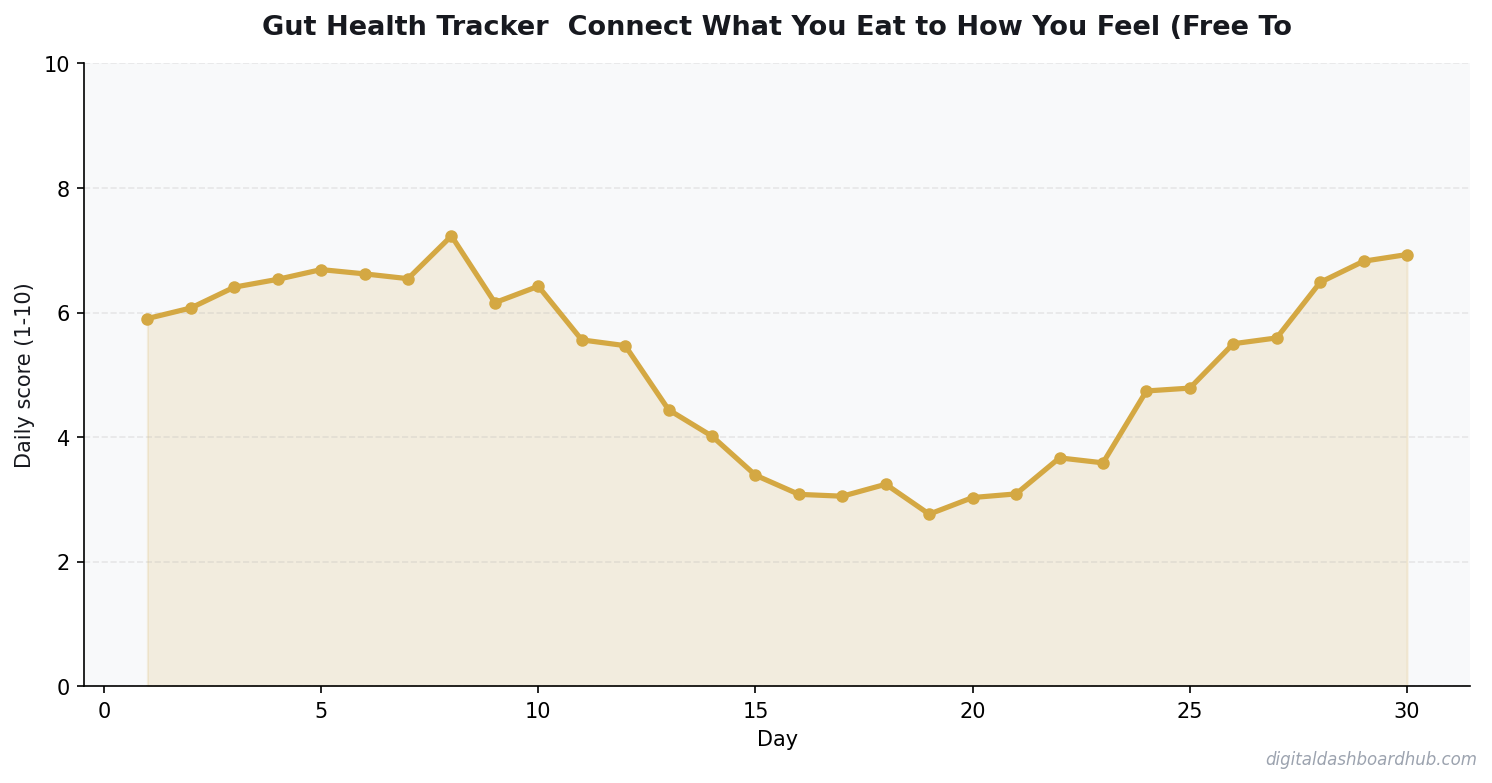
Step 1: Open the tracker and rate today’s key symptoms on a simple scale. Tap, don’t type. Three taps and your severity data is logged.
Step 2: Add context — what you ate, how you slept, stress level, medications. Pre-filled options mean you’re selecting, not writing paragraphs. Skip anything that doesn’t apply today.
Step 3: Check your trend dashboard. After a week, you start seeing patterns. After a month, those patterns become insights you can act on. The visualization does the analysis for you — no medical degree required.
The feature that gets the most feedback: the doctor visit summary. One tap generates a clean, printable overview of your last 30-90 days. Bring it to your appointment and watch your provider’s face light up with actual usable data.
Want to start tracking? Try the Gut Health Digestion Tracker free → 14 days, no credit card. Part of a library of 255+ health and wellness tools.
Gut Tracking Tools Compared
| Feature | Paper Journal | Generic Health App | DDH Tracker |
|---|---|---|---|
| Trend visualization | Manual | Basic | Automatic |
| Doctor-ready reports | Bring the notebook | Varies | One-tap export |
| Daily time required | 5-10 min | 3-5 min | 60-90 sec |
| Trigger correlation | Your memory | Limited | Automatic |
| Cost | $5-15 notebook | Free-$10/mo | Free trial |
FREE BONUS: Gut Symptom Tracking Starter Kit
A printable 1-page guide with the exact symptoms to track, how often, and what patterns to look for. Takes 2 minutes to read.
What 30 Days of Gut Tracking Usually Reveals
Most people expect gut tracking to produce a clear “food X causes problem Y” finding. Sometimes it does. More often, the first real finding is a pattern that wasn’t obvious before: symptoms cluster after high-stress days, or late eating consistently produces worse mornings, or the three “healthy” foods in your rotation are actually your biggest triggers.
The lag makes it complicated. Gut symptoms often follow a trigger by 12-48 hours, not immediately. If you’re eating breakfast and blaming dinner from three nights ago, the only way to find the real connection is a multi-week log with enough data to see the lag time.
The Patterns That Show Up Most Reliably
- Stress correlation: The gut-brain axis is real and powerful. High-stress days reliably predict gut symptoms 1-2 days later for most people with IBS or functional gut issues. Log your stress daily, even with a simple 1-5 scale.
- Sleep quality: Poor sleep disrupts gut motility and microbiome balance. Tracking both sleep and symptoms will almost certainly show a correlation — often within the first two weeks.
- Fiber timing: Adding fiber rapidly almost always causes temporary bloating, which people interpret as “fiber is bad for me.” The data shows it’s usually a 2-3 week adaptation issue. The solution is slow introduction, not elimination.
When to Stop Experimenting and See a Doctor
Your tracker is a tool for self-management, not self-diagnosis. Bring your log data to a doctor if you see: blood in stool, unintentional weight loss of 5+ pounds, symptoms that wake you up at night consistently, or any symptom that’s progressively worsening over 4+ weeks without identifiable trigger.
These aren’t normal gut variation. They’re flags that deserve investigation, and a well-maintained tracker gives a gastroenterologist much better data than “I’ve been having stomach problems for a few months.”
The Elimination Diet Mistake
Most people do elimination diets wrong: they remove a food for 3-4 days, feel the same, and conclude it’s fine. A proper elimination trial is 3-4 weeks, because the gut takes that long to fully clear some irritants and for symptoms to fully resolve. Tracker data is the only way to do this correctly — it shows you whether symptoms are actually trending down over the full elimination period, not just whether you feel better on day 4.
Keep reading (related guides):
255+ interactive tools for your money, time, and health.
14-day trial · Stripe checkout · Cancel anytime
⚡ Quick Gut Health Digestion Score
Track your symptoms in 30 seconds.
Basic score only. Get the full tracker with 255+ tools →
Your Next Move
Right now (90 seconds): Rate today’s gut symptoms on a 1-10 scale. Write it on a sticky note. That’s day one.
This week: Track symptoms for 5 consecutive days. Note what you ate, how you slept, and your stress level. Even basic data reveals patterns after 5 days.
The long play: Set up the DDH Gut Health Digestion Tracker. 60 seconds, free for 14 days, no credit card. After 30 days of data, you’ll walk into your next appointment with answers instead of guesses.
Questions people ask before using this tool
What if my Gut Health entries trigger anxiety about my symptoms?
Drop to weekly entries and only log the summary, not every fluctuation. The goal is information, not vigilance. If tracking itself becomes the symptom, the tool is not earning its place — talk to a therapist or care provider about reframing the data relationship.
How long before a Gut Health shows useful patterns?
Most users start spotting patterns at the 3-4 week mark. Anything shorter and the data is too noisy to separate signal from coincidence. Commit to daily (or near-daily) entries for a full month before you decide whether the tool is earning its keep.
Do I need to log every single day for a Gut Health to work?
No. Aim for 5 of 7 days. The gaps tell you something too — what days you were too symptomatic or too busy to log. Perfectionism is the #1 reason people quit health trackers in week three. Forgive gaps, keep going.
How is a Gut Health different from a journal?
A Gut Health forces structured fields — severity, duration, triggers, context — so patterns surface in aggregate. A journal captures nuance one day at a time. Use the tracker for the ‘what/when/how much’ questions and a journal for the ‘why do I feel this way’ ones.
What should I show my doctor from a Gut Health?
The summary view, not the raw log. Doctors have 7-15 minutes — lead with the trendline, the frequency, and any obvious correlations (trigger foods, stress, sleep). If they want more detail, offer the full log. Most appointments go better with less paper, not more.
Can a Gut Health replace medical testing?
No. What it replaces is the ‘I think my symptoms got worse around February’ guessing game. Your logs become ammunition for tests your doctor orders — they will not order a workup on ‘feeling off,’ but will on ‘logged 14 episodes across 30 days.’
Seven mistakes to avoid with this Gut Health tool
- Creating too many custom fields. Every extra field is a reason to skip the log. Start with 3-4 core fields and add more only after a month.
- Sharing raw data with your care team. Export the summary; they have seven minutes. The trendline and top 3 correlations earn their attention.
- Logging only on bad days. The baseline is what makes the spikes legible — if you skip good days, every entry looks alarming.
- Forgetting to log context. A pain score without ‘what you ate/slept/did’ is a number without a story. Context is where patterns live.
- Using the tracker to self-diagnose. Its job is to surface patterns and feed your doctor better data, not replace the visit.
- Panicking at week-two data. Short windows are noisy. Do not make medical decisions off 10 days of entries — 30 is the minimum meaningful dataset.
- Stopping the tracker when symptoms improve. The baseline of ‘feeling fine’ is what makes the next flare visible — keep logging through the calm stretches.
The value of a Gut Health tracker is not the data — it is the pattern recognition that compounds over months. Three entries a week for a year will outperform 30 entries in a single panicked month.
When to use this Gut Health tracker (and when to skip it)
This Gut Health tracker is most valuable in three windows: after a new diagnosis (first 90 days, building the baseline), during a medication or treatment change (when you need data on what is actually shifting), and before any specialist appointment (so your care team has more than your subjective recall to work with).
Skip the tool when it is creating more anxiety than insight. For some people, daily symptom logging becomes its own source of stress — if that is you, downshift to weekly summary entries or pause entirely for 30 days. The data is only valuable if the act of tracking doesn’t make your condition worse; listen to that signal if it shows up.
Used well, three to six months of consistent data is often more useful than any single test. Doctors frequently order a workup only when they see a pattern, and your logs are exactly that pattern. Bring the summary view to appointments, not the full log, and lead with ‘here is what I noticed’ — that framing changes how the conversation goes.
Gut Health quick reference checklist
Print this or bookmark it — the Gut Health works best when you keep these basics in view.
- You know which summary view to export for your next medical appointment.
- You noticed at least one pattern in the last 30 days of data.
- You are logging calm stretches too — the baseline is what makes flares visible.
- The entries include context — food, sleep, stress, medication — not just the raw score.
- You have logged on at least 5 of the last 7 days (or the last 3 if mid-flare).
- The tool takes you under 90 seconds a day; if it takes longer, trim a field.
What to do next
Once you have walked the checklist, scroll back up and run your real inputs in the interactive Gut Health tool — it takes about 60 seconds. If you want to compare this against the other 254+ calculators, trackers, and planners in the DDH library, the full set lives at app.digitaldashboardhub.com. Free tier covers the core version of every tool; upgrades unlock cross-tool dashboards, scenario saving, and team sharing.
If you are brand new to the DDH toolkit, start with three tools: one that directly serves your primary goal this quarter, one that catches problems before they compound, and one just for fun. That mix prevents the usual fate of productivity tools — great first month, forgotten by month three.
Keep Reading
- BetterHelp vs DDH Therapy Tracker: Which Actually Helps Your Mental Health?
- Free Eczema Skin Health Tracker: Log Symptoms and Spot Patterns Fast
- Free Thyroid Health TSH T4 Tracker: Log Symptoms and Spot Patterns Fast
- Depression Mood Tracker: How Tracking Your Mental Health Data Helps You Heal
Common Questions About Gut Health Tracker: Connect What You Eat to How You Feel (Free Tool)
How long does it take to see results?
Most people see meaningful progress within 30-90 days when they apply these strategies consistently. The key is tracking your numbers from day one so you have a baseline to measure against.
What’s the biggest mistake people make?
Trying to do everything at once. Pick one or two strategies from this guide, implement them fully, then layer in additional tactics. Spreading yourself thin is the fastest way to see no results from any of it.
Do I need special tools or software?
Not necessarily to start — but the right tools eliminate hours of manual work. Our free calculators and trackers at Digital Dashboard Hub are a good starting point before you invest in paid software.

Andy Gaber is the founder of Digital Dashboard Hub, a suite of 255+ interactive financial, productivity, and wellness tools. He built DDH after getting frustrated with financial apps that gave outputs without context. Follow along for tool tutorials, revenue analytics breakdowns, and honest takes on personal finance.